
 Download als PDF File
Purpose
This note describes the use of GRE tunnels in Huawei SD-WAN, their two primary use cases (connecting non-SD-WAN sites and IPv6 migration over IPv4 overlay), and the relevant constraints and configuration parameters.
GRE in the SD-WAN Context
GRE (Generic Routing Encapsulation) is not the primary tunnel protocol for site-to-site overlay in SD-WAN (that role belongs to EVPN/IPsec). Instead, it is used for specific supplementary scenarios:
| Use Case | Description |
|---|---|
| Non-SD-WAN site connectivity | GRE tunnel from CPE to a legacy or third-party endpoint |
| IPv6 GRE over IPv4 overlay | Transport IPv6 traffic over an existing IPv4 underlay |
| Cloud security gateway | GRE tunnel to Zscaler/ForcePoint (covered in a separate note) |
In iMaster NCE-Campus, the configuration is found at:
Network Configuration > SD-WAN > Physical Network > Tunnel Configuration > Interconnection with Non-SD-WAN Sites > GRE
GRE Tunnel Types
Underlay GRE Tunnel
- Tunnel is built on the physical network
- Source IP is typically the IPv4 address of the WAN interface of the CPE
- Destination IP is the address of the remote endpoint (e.g., legacy router or third-party gateway)
- No VN context required
- Use case: direct L3 connection to non-SD-WAN systems
Overlay GRE Tunnel
- Tunnel is built within a
VN instance(VRF) - Prerequisite: a
Loopback Interfacemust be configured in advance as the source interface - Source IP: IP address of the loopback interface in the overlay
- Destination IP: IP address of the loopback interface at the remote endpoint
- Use case: transport IPv6 traffic over IPv4 overlay infrastructure
IPv6 GRE over IPv4 Overlay
This scenario is relevant for enterprises migrating their LAN infrastructure to IPv6 while still operating an IPv4-based SD-WAN underlay.
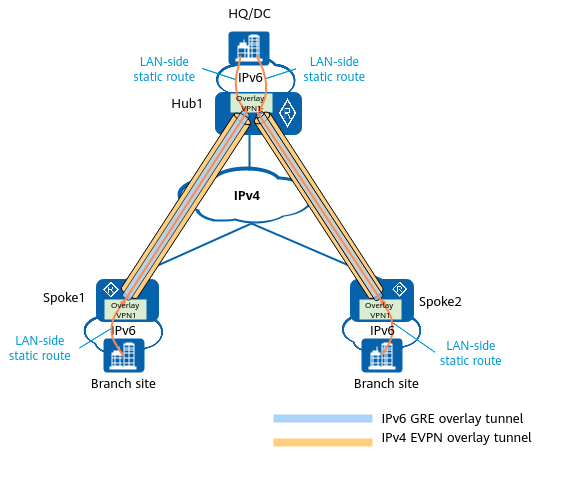
Procedure:
- Create overlay topology and VN with IPv6 support enabled
- Configure an IPv6 pool in the controller (
Network Configuration > SD-WAN > Global Configuration > Virtual Network) - Define overlay loopback interfaces as tunnel source and destination interfaces
- Configure overlay GRE tunnels (type: IPv6)
- Define LAN-side static routes that steer IPv6 traffic into the GRE tunnel
Prerequisite:
- All involved devices must support V300 (or V600)
- IPv6 pool must be configured in the controller
Important note for V600:
When an IPv6 GRE tunnel is configured over an IPv6-disabled WAN link, the controller automatically delivers the IPv6 family configuration to the VPN. When the GRE tunnel is deleted, the IPv6 family configuration is not automatically removed from the device — manual cleanup is required.
GRE Configuration Parameters
| Parameter | Description |
|---|---|
Device |
CPE on which the GRE tunnel is configured |
Server network |
Underlay or Overlay |
VN Instance |
Overlay only: VN in which the tunnel is deployed |
Interface |
Name of the GRE tunnel interface (e.g., Tunnel1) |
Interface IP Address Type |
IPv4 or IPv6 |
Interface IPv4/IPv6 address |
IP address of the tunnel interface (same subnet as the peer) |
