
 Download als PDF File
We recently ran into an interesting issue with Ekahau AI Pro in an enterprise environment using SSL inspection.
Symptom:
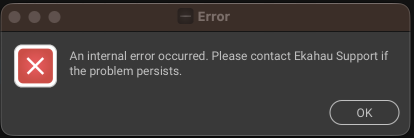
Cloud projects would not load at all.
Root cause (most likely):
As soon as SSL inspection was disabled on the firewall, everything worked instantly. This strongly suggests that Ekahau either uses certificate pinning or otherwise does not tolerate TLS interception.
Initial troubleshooting:
We followed Ekahau’s official documentation and allowed all listed domains:
-
ekahau.cloud
-
ekahau.zendesk.com
-
ekahauwireless.zendesk.com
-
license.ekahau.com
-
support.ekahau.com
-
sw.ekahau.com
Despite this, the issue persisted.
What actually fixed it:
After deeper traffic analysis and feedback from Ekahau support, we identified that additional AWS S3 endpoints are required. Only after excluding these from SSL inspection did the cloud functionality start working:
-
eka-prod-images-active-bucket-lubb98qok4of68tm.s3.eu-west-1.amazonaws.com
-
eka-prod-images-draft-bucket-fsg19cchx9kgk7u7.s3.eu-west-1.amazonaws.com
-
eka-prod-ai-walls-artifacts-bucket-2ajc8iewa83s4xch.s3.eu-west-1.amazonaws.com
-
eka-prod-logcollectorapi-bucket-5p386rxx0rl8mmhz.s3.eu-west-1.amazonaws.com
-
eka-prod-esx-file-upload-bucket-6d05ckye2j17vvgv.s3.eu-west-1.amazonaws.com
-
eka-prod-survey-binaries-active-bucket-e1lw1wtq8m9jg38i.s3.eu-west-1.amazonaws.com
-
eka-prod-survey-binaries-draft-bucket-8tcc9q0sg8oukw8p.s3.eu-west-1.amazonaws.com
Key takeaway:
Allowing only the documented Ekahau domains is not sufficient. Ekahau AI Pro relies on dynamically named AWS S3 buckets, and SSL inspection must be bypassed for those endpoints as well.
If you want to avoid broad exceptions like *.s3.eu-west-1.amazonaws.com, be prepared to do some packet-level analysis to identify the exact buckets in use.
Recommendation:
If Ekahau cloud features are critical, plan for either:
-
targeted SSL inspection bypass (per S3 bucket), or
-
a broader exception for the relevant AWS region
Otherwise, expect broken cloud functionality.
